
INLretro
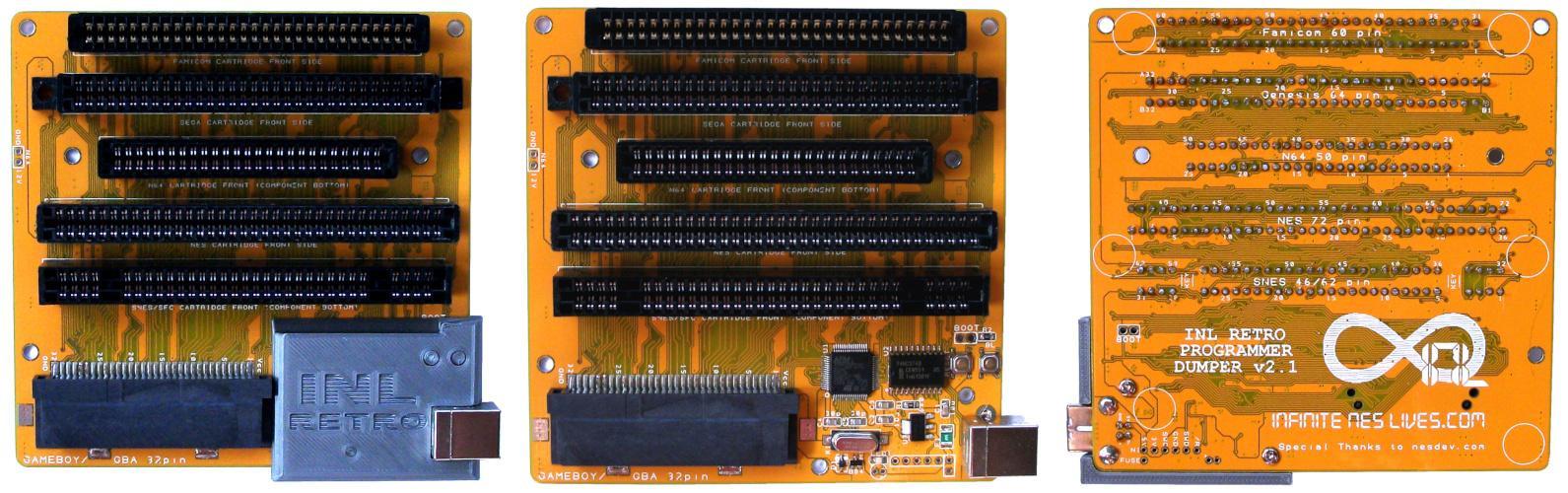
The INLretro is a multi-consoles cartridge dumper/flasher device created by InfiniteNesLives in 2016.
Since 2018, it replaced the Kazzo device.
Since 2021, the project seems to be closed.
The board includes 6 connectors for various consoles :
- Nintendo NES (72 pins)
- Famicom (60 pins)
- Super Nintendo (SNES) / SFC (62 pins)
- Sega Genesis / MegaDrive (MD) (64 pins)
- Nintendo 64 (N64) (50 pins)
- Gameboy / GameBoyAdvance (GBA) (32 pins)
It works with a STM32F070RB microcontroller and a 74HC374 chip.
It needs to be connected to an USB port of a computer (for example), so it can be used without an original console (contrary to CopyNES).
STM32F070RB microcontroller is an Arm Cortex-M0 32-bit RISC core operating at a 48 MHz frequency with 128 Kbytes of Flash memory that contains the INLretro firmware that can be modified and updated.
INLretro hardware works with the associated software INLretro-progdump which works on Windows, Linux and Mac.
The official software is available on Gitlab : https://gitlab.com/InfiniteNesLives/INL-retro-progdump
It uses LUA scripts for dumping or flashing cartridges.
For now, it supports essentially :
- FAMICOM and Nintendo NES cartridges
- SNES/SFC HiROM et LoROM cartridges
The explanations in the following paragraphs are based on the Linux version.
Commands to execute in a terminal :
- Dependencies installation :
sudo apt-get install libusb-1.0-0-dev
- INLretro compilation / installation :
   mkdir INLretro
   cd INLretro
   git clone https://gitlab.com/InfiniteNesLives/INL-retro-progdump.git
   cd INL-retro-progdump/host
   make unix
Note : Compilation warnings can be ignored.
- Execution :
   su
   ./inlretro -c NES -s scripts/inlretro2.lua -m nrom -x 256 -y 128 -d dumpfile.nes
Note : For Windows, the executable is already compiled in the INL-retro-progdump-master/host directory, and the syntax is “inlretro.exe” in replacement of “./inlretro”
Syntax :
 ./inlretro -c [CONSOLE] -s scripts/inlretro2.lua -m [DUMP_SCRIPT] -x [PRG_SIZE_IN_KB] -y [CHR_SIZE_IN_KB] -d dumpfile.nes
 ./inlretro -c [CONSOLE] -s scripts/inlretro2.lua -m [DUMP_SCRIPT] -x [PRG_SIZE_IN_KB] -y [CHR_SIZE_IN_KB] -p flashfile.nes
| Parameter | Description |
|---|---|
| [CONSOLE] | This argument can be : NES, GBA, N64, GENESIS "NES" is used for NES or FAMICOM cartridges |
| [DUMP_SCRIPT] | For NES console, this argument can be : action53, bnrom, cdream, cninja, cnrom, dualport, easynsf, fme7, mapper30, mmc1, mmc3, mmc4, mmc5, nrom, unrom or another mapper that can be added in INL-retro-progdump-master/host/scripts/nes directory, and in the mappers variable in the nes_exec() function of INL-retro-progdump-master/host/scripts/inlretro2.lua |
| [PRG_SIZE_IN_KB] | The size of the PRG in KBytes |
| [CHR_SIZE_IN_KB] | The size of the CHR in KBytes |
| -d dumpfile.nes | For dumping the cartridge in the file dumpfile.nes |
| -p flashfile.nes | For flashing the file flashfile.nes in the cartridge |
Example :
./inlretro -c NES -s scripts/inlretro2.lua -m mmc3 -x 256 -y 128 -d SuperMarioBros3.nes
This command permits to dump the cartridge “Super Mario Bros 3” which is MMC3 mapper and have 256 Kb of PRG and 128 Kb of CHR.
INLretro-progdump uses LUA scripts to dump or flash cartridges.
LUA scripts for NES or FAMICOM cartridges are in the directory : INL-retro-progdump-master/host/scripts/nes
The LUA syntax is heavier and more complex than the Anago syntax, but it offers additional capabilities. An INLretro script can be 7 times larger or more than an Anago script for the same mapper.
Basically, a LUA dumping script has the structure :
| mapperXXXX.lua |
|---|
| local mapperXXXX = {} local function create_header( file, prgKB, chrKB ) end local function init_mapper( debug ) end local function dump_prgrom( file, rom_size_KB, debug ) end local function dump_chrrom( file, rom_size_KB, debug ) end local function process( process_opts, console_opts ) end mapperXXXX.process = process return mapperXXXX |
XXXX is the mapper’s number.
The name of the dumping script needs to be identical than the local variable inside : mapperXXXX.lua
Warning : Using lowercase letters and numbers for the variable and the filename works fine, but using capital letters isn’t possible because the program is case-insensitive.
For adding a script, there is 2 steps :
- Save the new script with .lua extension in the directory INL-retro-progdump-master/host/scripts/nes
- Add the new script name in the mappers variable of nes_exec() function in the main application logic script INL-retro-progdump-master/host/scripts/inlretro2.lua :
 [...]
 function nes_exec(process_opts, console_opts)
     [...]
     local mappers = {
         action53_tsop = require "scripts.nes.action53_tsop",
         action53 = require "scripts.nes.action53",
         bnrom = require "scripts.nes.bnrom",
         [...],
         mapperXXXX = require "scripts.nes.mapperXXXX"
     }
 [...]
The new script can be run in command-line with :
./inlretro -c NES -s scripts/inlretro2.lua -m mapperXXXX -x 256 -y 128 -d dumpfile.nes
Contrary to Anago, the names of the functions in the LUA scripts are not defined in the INLretro ’s software code (except the process() function) but in the LUA script itself, so the functions can be named freely. But for convention and lisibility of scripts, it’s better to use the same as those existant.
A basic LUA dumping script contains 5 functions.
Several mappers may have additional functions like dump_wram(), but this is uncommon.
For a basic LUA flashing script, replace dump_prgrom() and dump_chrrom() functions by the 2 functions :
   local function flash_prgrom(file, rom_size_KB, debug)
   ...
   end
   local function flash_chrrom(file, rom_size_KB, debug)
   ...
   end
A complete LUA script contains both dumping and flashing functions.
- Function create_header()
This function writes the header in the dump file. The common content is something like :
 local function create_header( file, prgKB, chrKB )
     nes.write_header( file, prgKB, chrKB, mapperNumber, mirroring )
 end
| file prgKB chrKB | No modification needed on these parameters that are transmitted by the command-line. |
| mapperNumber | The number of the mapper to write in the header of the dump file. The value type is Integer. |
| mirroring | If mirroring="VERT", mirroring is set to vertical in the header of the dump file. Else (for example : "HORZ"), mirroring is set to horizontal in the header of the dump file. The value type is String. |
Example :
 local function create_header( file, prgKB, chrKB )
     nes.write_header( file, prgKB, chrKB, 58, "VERT")
 end
In this example, the mapper is set to 58 and the mirroring to vertical in the header of the dump file.
- Function init_mapper()
This function is only used for mappers that need to be initialized like MMC1, FME7 or others.
In many cases, this function is empty.
- Function dump_prgrom()
This function contains the method for dumping PRG rom. Basically, for a cartridge whose PRG banks are 16Kb and dump formula is 0x8000 | i (i : iteration counter), this function can be :
 local function dump_prgrom( file, rom_size_KB, debug )
     --PRG-ROM dump 16KB at a time
     local KB_per_read = 16
     local num_reads = rom_size_KB / KB_per_read
     local read_count = 0
     local addr_base = 0x80   -- $8000

     print("CPU dump :")
     while ( read_count < num_reads )
     do
         if debug then print( "dump PRG part ", read_count, " of ", num_reads) end

         --optional one-second pause to reduce stress on the chips--
         local time=os.clock()+1
         while time>os.clock()
         do
         end

         local addrpart = 0x8000 | read_count
         local datapart = 0

         dict.nes("NES_CPU_WR", addrpart , datapart)
         dump.dumptofile( file, KB_per_read, addr_base, "NESCPU_PAGE", false )

         read_count = read_count + 1
     end
 end
Main functions used :
1) function nes(opcode, addrpart , datapart)
| opcode | Value can be "NES_CPU_WR" , "NES_PPU_WR" , "M2_LOW_WR" , "M2_HIGH_WR" , "NES_CPU_RD" , "NES_PPU_RD" ... All possible values of opcode are in INL-retro-progdump-master/shared/shared_dict_nes.h The value type is String. |
| addrpart | Formula depending of the base address for the dump and the iteration variable read_count based on the CPU_Ax description (x=0 to 15). Example : 0x8000 | read_count |
| datapart | Formula depending of the iteration variable read_count based on the CPU_Dx description (x=0 to 7). Example : read_count |
If opcode = “NES_CPU_WR”, this function is equivalent to the Anago function : cpu_write(d, addrpart, datapart);.
2) function dumptofile(file, sizeKB, map, mem, debug)
| file | Output file. |
| sizeKB | Size of the read in KBytes. |
| map | Base address where to read datas. Cf Warning below. |
| mem | Size of the page to read. Value can be : NESCPU_PAGE , NESPPU_PAGE , NESCPU_4KB , NESPPU_1KB All possible values of mem are in INL-retro-progdump-master/shared/shared_dict_buffer.h |
| debug | true for debug false for no debug |
This function is equivalent to the Anago function : cpu_read(d, address, banksize) with map corresponding to address and sizeKB = banksize / 1024.
Warning :
In a lot of case, if address=0x8000 with Anago, it gives map=0x80 with INLretro.
But for several mappers (MMC1, FME7, …), address=0x8000 with Anago is traduced by map=0x08 with INLretro.
If the dump file contains only 0xFF bytes, it can be useful to try to replace map=0x80 by map=0x08 for getting datas from the cartridge.
- Function dump_chrrom()
This function contains the method for dumping CHR rom. Basically, for a cartridge whose CHR banks are 8Kb and dump formula is 0x8000 | i (i : iteration counter), this function can be :
 local function dump_chrrom( file, rom_size_KB, debug )
     --CHR-ROM dump 8KB at a time
     local KB_per_read = 8
     local num_reads = rom_size_KB / KB_per_read
     local read_count = 0
     local addr_base = 0x00   -- $0000

     print("PPU dump :")
     while ( read_count < num_reads )
     do
         if debug then print( "dump CHR part ", read_count, " of ", num_reads) end

         --optional one-second pause to reduce stress on the chips--
         local time=os.clock()+1
         while time>os.clock()
         do
         end

         dict.nes("NES_CPU_WR", 0x8000 | read_count , 0)
         dump.dumptofile( file, KB_per_read, addr_base, "NESPPU_PAGE", false )

         read_count = read_count + 1
     end
 end
- Function process()
This function is the entry point of the script. It’s like the main function in C. Its role is to run the other functions :
 local function process(process_opts, console_opts)
     [...]
     init_mapper()
     [...]
     create_header(file, prg_size, chr_size)
     [...]
     dump_prgrom(file, prg_size, false)
     dump_chrrom(file, chr_size, false)
     [...]
 end
This table describes differences and correspondences between the two syntaxes : the left part in Anago syntax can be traduced by the right part in INLretro syntax.
| Anago | INLretro |
|---|---|
| Mapper and mirroring in the board variable : board <- { ... mappernum = 194, ... ... vram_mirrorfind = true }; Note : vram_mirrorfind = true is vertical mirroring vram_mirrorfind = false is horizontal mirroring | Mapper and mirroring in the create_header() function : local function create_header( file, prgKB, chrKB ) nes.write_header( file, prgKB, chrKB, 194, "VERT") end |
| PRG size and CHR size in the script and in bytes : board <- { ... cpu_romsize = 262144, ... ... ppu_romsize = 131072, ... }; Note : 262144 bytes = 256 Kbytes 131072 bytes = 128 Kbytes | PRG size and CHR size in the command-line and in Kbytes : ./inlretro -c NES -s scripts/inlretro2.lua -m mmc3 -x 256 -y 128 -d SuperMarioBros3.nes Note: Commonly used syntax, but it can also be set in the script with : variables prg_size and chr_size in process() function. |
| CPU banksize and PPU banksize in bytes in the board variable: board <- { ... cpu_banksize = 0x4000, ... ... ppu_banksize = 0x2000, ... }; Note : 0x4000 = 16384 bytes = 16 Kbytes 0x2000 = 8192 bytes = 8 Kbytes | CPU banksize and PPU banksize in Kbytes in the dump_prgrom() and dump_chrrom() functions : ... local function dump_prgrom( file, rom_size_KB, debug ) --PRG-ROM dump 16KB at a time local KB_per_read = 16 ... end ... local function dump_chrrom( file, rom_size_KB, debug ) --CHR-ROM dump 8KB at a time local KB_per_read = 8 ... end ... |
| Write address and data formula in cpu_dump() and ppu_dump() functions : cpu_write(d, 0x8000 | i, 0); | Write address and data formula in dump_prgrom() and dump_chrrom() functions : dict.nes("NES_CPU_WR", 0x8000 | read_count, 0) |
| Read address in cpu_dump() and ppu_dump() functions : cpu_read(d, 0x8000, banksize); | Read address in dump_prgrom() and dump_chrrom() functions : ... dump.dumptofile( file, KB_per_read, 0x80, "NESCPU_PAGE", false ) ... Note : KB_per_read corresponds to banksize in the Anago script converted in Kbytes 0x80 corresponds to address 0x8000 in the Anago script NESCPU_PAGE is commonly used because it gets all the datas in the page |
| Read 2 consecutive 16Kb banks (0x8000 + 0x4000 = 0xc000) : board <- { ... cpu_banksize = 0x8000, ... }; ... cpu_read(d, 0x8000, 0x4000); cpu_read(d, 0xc000, 0x4000); ... Note : 0x8000 = 32768 bytes = 32 Kbytes 0x4000 = 16384 bytes = 16 Kbytes The 2 cpu_read() have to be separated to avoid Anago error : length range must be 0x000000 to 0x004000 | Read 1 x 32Kb bank : ... local KB_per_read = 32 ... local addr_base = 0x80 -- $8000 ... dump.dumptofile( file, KB_per_read, addr_base, "NESCPU_PAGE", false ) ... Note : With INLretro getting a 32Kb bank doesn't generate any error |
   [ERROR] (source/usb_operations.c:159: errno: Resource temporarily unavailable) Could not find INL retro-prog USB device
   open_usb_device went to error
   freeing device list
   deinitializing libusb
   [ERROR] (source/inlprog.c:361: errno: None) Unable to open INL retro-prog usb device handle.
   Fatal error encountered, exiting.
Solution : The device isn’t plugged to the USB port.
   [ERROR] (source/usb_operations.c:110: errno: Permission denied) Unable to open USB device: Access denied (insufficient permissions).,

   DEVICE FOUND, BUT CAN'T OPEN DEVICE, VERIFY DRIVERS ARE INSTALLED!!!
   open_usb_device went to error
   freeing device list
   deinitializing libusb
   -------------------------------------------------------
   Denied Permission is expected for initial use on Linux.
   See udev-rule-help/Readme.txt in host dir for help gaining permission.
   Try command with sudo for a cheap temporary solution.
   [ERROR] (source/inlprog.c:361: errno: None) Unable to open INL retro-prog usb device handle.
   Fatal error encountered, exiting.
Solution : This error indicates that the user doesn’t have the permission for accessing to USB device.
A simple workaround is to run INLretro in root mode in a terminal, though this causes dumped ROM files to have root ownership/permissions :
   su
   ./inlretro -c NES -s scripts/inlretro2.lua -m nrom -x 256 -y 128 -d dumpfile.nes
or :
sudo ./inlretro -c NES -s scripts/inlretro2.lua -m nrom -x 256 -y 128 -d dumpfile.nes
The proper solution is to create a udev rule to add the INLretro device to a group with appropriate USB/serial permissions, such as uucp on Arch.
   Successfully found and connected to INL retro-prog
   Device firmware version: 2.3.x
   firmware app ver request:    3
   UNSUPPORTED MAPPER:  mapperXXXX
Solution : This error indicates that the mapper isn’t in the list. Go to Add a script section to add it.
All seem to be correct in the process but the dump file contains only 0xFF bytes.
Solutions :
- Unplug the INLretro dumper from the computer for a while to let it rest. Plug it back in after several minutes.
- Try to replace addr_base = 0x80 by 0x08 in dumptofile(file, KB_per_read, addr_base, “NESCPU_PAGE”, false) function in the dumping script.